Article language: English
Best Lawn Care Scheduling Software for Small Crews in 2026
Small lawn care crews need a clear schedule, repeat jobs, worker assignments, estimates, invoices, and mobile access without a lot of extra software.

Lawn care businesses move fast.
You may have several stops in one day, weekly customers, new quote requests, workers in the field, weather changes, and invoices waiting at the end of the day.
That is a lot to keep track of.
For a small lawn care crew, good scheduling software can make the day much easier.
But the best lawn care scheduling software is not always the biggest or most expensive option.
A small company needs a system that helps the owner stay organized and helps the crew know what is next.
The schedule should make the day easier to understand, not harder.
What should lawn care scheduling software do?
For most small lawn care businesses, these are the basics.
| Feature | Why it matters |
|---|---|
| Clear calendar | Shows what jobs are coming up |
| Recurring jobs | Handles weekly and repeat service |
| Worker assignments | Shows each person what they are doing |
| Booking requests | Gives new customers an easy way to ask for service |
| Estimates | Keeps quotes organized |
| Invoices | Keeps billing tied to the work |
| Time tracking | Helps track worker hours |
| Customer history | Saves notes and past jobs |
| Mobile access | Lets the crew use it in the field |
| Tools and fleet | Helps track equipment and vehicles |
Why a basic calendar stops being enough
When the business is small, a phone calendar may work.
Then the schedule starts filling up.
You have Mrs. Smith every Tuesday, three new estimates, a cleanup that got moved because of rain, two workers going in different directions, a new customer who messaged on Facebook, and an invoice you forgot to send.
Now a calendar by itself is not really managing the job.
It is only showing the time.
Good lawn care software connects the schedule to the customer, workers, notes, estimate, and invoice.
1. A schedule you can understand quickly
You should be able to open the software and see the week.
You should not have to click around just to answer:
- What are we doing today?
- What is tomorrow?
- Who is assigned?
- Which jobs are repeat jobs?
- What got moved?
This sounds simple, but it is one of the biggest things software can fix.
See the calendar in Shookio
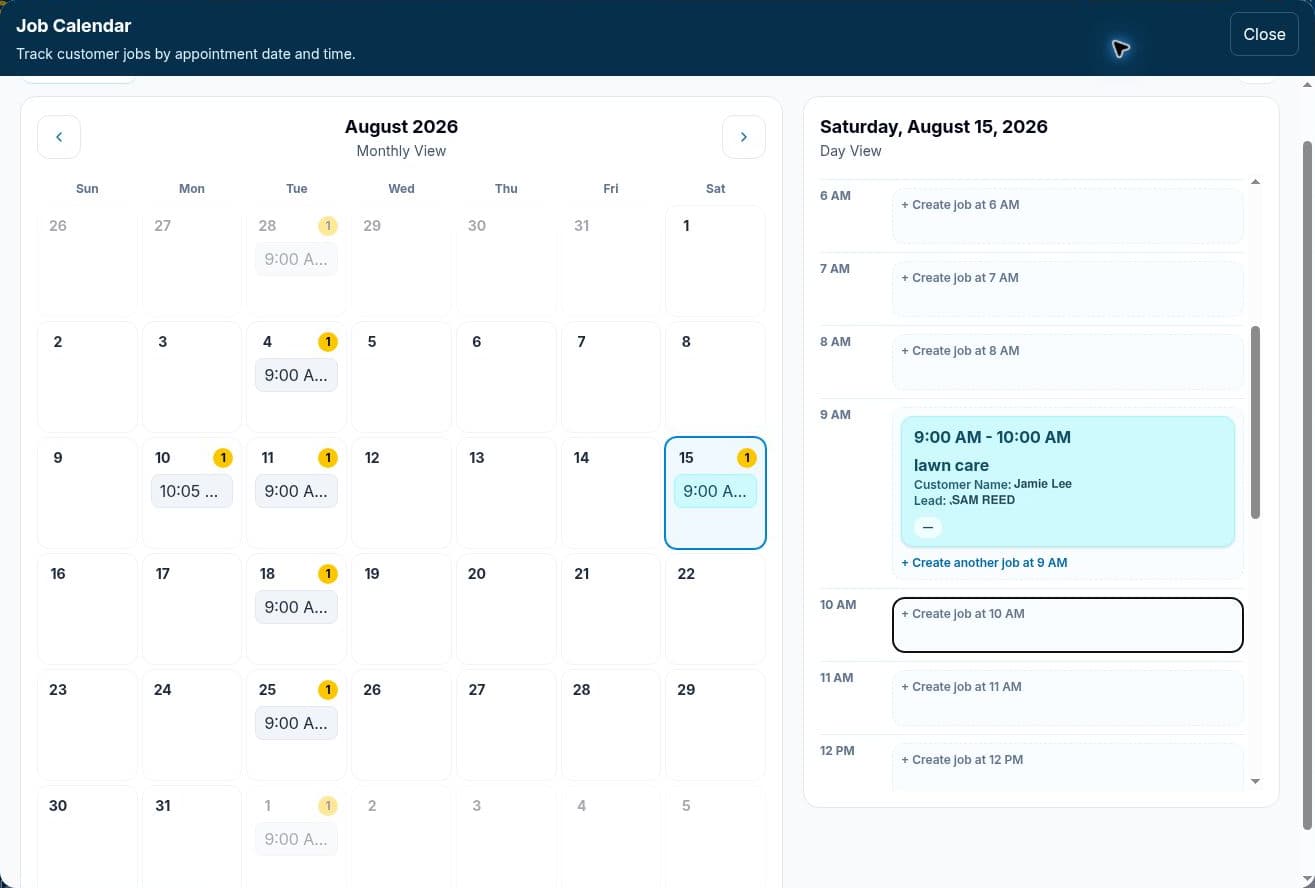
Actual screenshot of the regular Shookio calendar. Identifying details have been replaced for privacy.
The calendar puts scheduled jobs in a month view, with the selected day’s work beside it. In this example, the job card shows the start time, customer, status and assigned worker so the owner can check the plan at a glance.
2. Recurring jobs
Recurring jobs are very important for lawn care.
A lawn company may have customers scheduled every week, every other week, once a month, every spring, or every fall.
You should not have to rebuild the same mowing job every seven days.
A recurring job system saves time and makes it harder to forget regular customers.
Shookio includes recurring jobs so a company can keep repeat work on the schedule.
3. Worker assignments
Even a small crew needs to know who is doing what.
Once you have more than one worker, the owner should be able to assign jobs and let the workers see their own work.
That helps cut down on messages like:
“Where am I going?”
“What time is the next one?”
“What was the address?”
The job should already have that information.
4. Customer booking requests
A lot of lawn care businesses get leads from Google, Facebook, Instagram, neighborhood groups, and referrals.
A public booking page gives those people a place to request service.
With Shookio, you can share your business booking link. The customer can send a request, and you can review it before creating the job.
For a small company without a big website, that can be very useful.
5. Estimates
Lawn care is more than mowing.
You may quote:
- trimming
- edging
- spring cleanup
- fall cleanup
- leaf removal
- mulch
- bush trimming
- one-time yard cleanup
Keeping estimates in the same system as the customer and job makes the business easier to follow.
6. Invoices
The faster and easier billing is, the better.
You do not want to finish a long day and then spend hours rebuilding customer information in a different program.
A connected job and invoice system can save time.
7. Time tracking
When you have workers, you need to know how many hours they worked.
Small businesses often start with texts or handwritten notes.
That can get messy.
Timecards give you one place to review worker hours.
Shookio includes worker time tracking so the schedule and crew management are not completely separate.
8. Customer history
A regular lawn customer may stay with you for years.
You may need to remember what services they get, when they are normally scheduled, old job notes, past estimates, special instructions, and what you charged before.
Keeping that history tied to the customer helps when the business gets bigger.
9. Mobile access
Lawn care crews do not sit at desks.
They are in trucks, yards, and job sites.
That means the software has to work well on a phone.
A worker should be able to check today's work and understand what is next.
An owner should be able to make a change without going home to a computer.
10. Tools and fleet
Lawn care companies carry a lot of equipment.
Depending on the business, that can include mowers, trimmers, blowers, trailers, trucks, and small tools.
Shookio includes Tool Shop and Fleet features so a company can keep track of equipment and vehicles and which worker has them.
For a small blue-collar crew, that can matter just as much as the schedule.
What small lawn care businesses may not need yet
A small crew may not need every advanced feature sold by a large field service company.
That can include:
- advanced route systems
- large sales pipelines
- AI phone answering
- complex marketing tools
- deep business reports
- huge integration libraries
- multi-location controls
Those tools can be valuable for bigger companies.
But a three-person lawn care crew may mostly need to know:
Who is going where, what needs to be done, when it is due, and whether the customer was billed.
Essential now vs. useful later
| Usually important now | May be more useful later |
|---|---|
| Weekly schedule | Advanced route optimization |
| Recurring jobs | Complex automation |
| Worker assignments | Large sales pipeline |
| Booking requests | Call-center tools |
| Estimates | Enterprise reports |
| Invoices | Large integration library |
| Timecards | Multi-location controls |
| Mobile access | Advanced office workflows |
Where Shookio fits
Shookio is built for small service businesses and crews.
For lawn care, the core setup includes:
- public booking
- jobs
- scheduling
- recurring jobs
- worker assignments
- timecards
- estimates
- invoices
- customer sign-offs
- job reports
- tools
- fleet
- mobile access
The goal is not to give a small lawn company 200 things to learn.
The goal is to put the important parts of the business in one place.
You can read our broader guide to field service management software for small business for more on that approach.
How to pick lawn care scheduling software
Do not choose from the home page alone.
Try to picture a normal Tuesday in your business.
Then ask these questions.
Can I see the week quickly?
The schedule should be clear.
Can it handle weekly and repeat customers?
If mowing is your main service, recurring work matters.
Can workers see their jobs?
The system should help the crew too, not just the owner.
Can a new customer request service?
A booking link can help turn online traffic into leads.
Can I create estimates and invoices?
Those are basic parts of running a service company.
Can I use it from my phone?
If not, it may not fit field work very well.
Am I paying for features I do not use?
More features are only better when those features actually help your company.
What about bigger platforms?
Jobber and Housecall Pro are well-known field service platforms with larger feature sets.
For some lawn care companies, those extra tools may be worth paying for.
For a small crew that wants the basics, a simpler option may be enough.
We compared the pricing and features in Shookio vs. Jobber and Housecall Pro.
How much does Shookio cost?
Shookio starts at $29 per month for 2 people total.
The core feature set stays included as you move through the plans. The main difference is how many people the company needs.
That is meant to keep pricing simple for growing crews.
Related guides
If you are comparing software for a small service company, these are useful next:
- Field Service Management Software for Small Business
- Shookio vs. Jobber and Housecall Pro
- Best Gutter Cleaning Software for Small Businesses
Final thoughts
The best lawn care scheduling software for a small crew should help the day run smoother.
It should make the schedule clear, keep repeat customers from getting forgotten, show workers where to go, and keep estimates and invoices close to the job.
A small lawn company does not need the biggest software system in the industry just to stay organized.
It needs the right amount of software for the size of the business.
If you want a simple system for jobs, schedules, workers, timecards, estimates, invoices, tools, and fleet, take a look at Shookio.